Stable Diffusion
This guide will show you how to install the Stable Diffusion model on RACKRR and generate images from text prompts.
Alternative to Hugging Face
Running the Stable Diffusion model on RACKRR is a less expensive alternative to using Hugging Face. The Stable Diffusion model is a powerful generative model that can be used to generate images from text prompts. The model is hosted on Hugging Face, but you can also run it on RACKRR.
Prerequisites
Be sure to follow the instructions in the Getting Started guide to set up your RACKRR account and select a RACKRR VM.
Before continuing, you will need the following:
- A RACKRR account
- A RACKRR VM running Ubuntu 22.04
Installation
Follow these steps to install the Stable Diffusion model on RACKRR.
Update repository package list
sudo apt-get update
Install dependencies
sudo apt install python3-pip
Upgrade pip and install required libraries
pip install --upgrade diffusers transformers scipy torch accelerate transformers[sentencepiece]
Add the local bin directory to the PATH
echo 'export PATH=$PATH:/home/ubuntu/.local/bin' >> ~/.bashrc
source ~/.bashrc
Accept Hugging Face Hub License Agreement
NOTE: The Stable Diffusion model is hosted on Hugging Face. You will need to log in or sign up at Hugging Face and accept their license agreement for the model.

Create a Hugging Face token
Create a read-only token at https://huggingface.co/settings/tokens.
Save the token to a file
echo "your-token" > ~/.huggingface-token
Write a script to use the library
import os
import torch
from diffusers import StableDiffusion3Pipeline
from huggingface_hub import login

# Read token from file
with open(os.path.expanduser('~/.huggingface-token'), 'r') as file:
   token = file.read().strip()

# Log in to Hugging Face Hub using the token
login(token=token)

# Load the pipeline
pipe = StableDiffusion3Pipeline.from_pretrained("stabilityai/stable-diffusion-3-medium-diffusers", torch_dtype=torch.float16)
pipe = pipe.to("cuda")

# Generate the image
image = pipe(
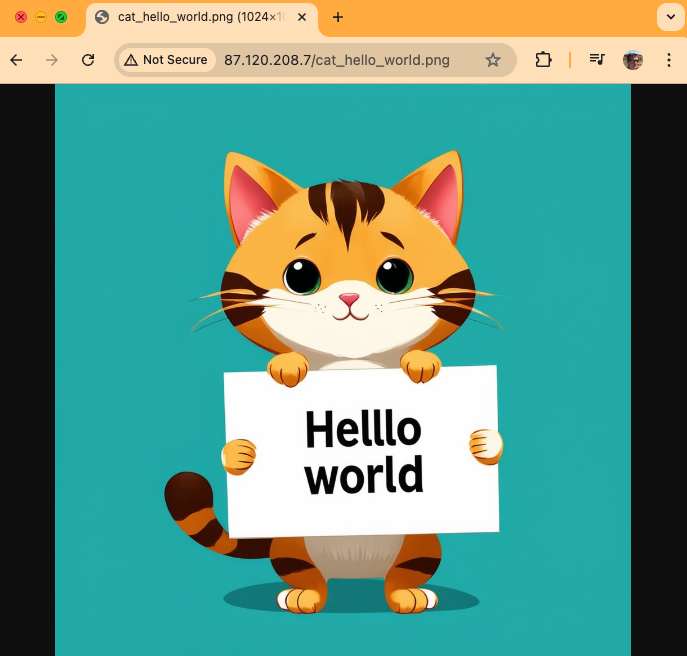
   "A cat holding a sign that says hello world",
   negative_prompt="",
   num_inference_steps=28,
   guidance_scale=7.0,
).images[0]

# Ensure the directory exists
output_dir = "images"
os.makedirs(output_dir, exist_ok=True)

# Save the image to a file
image.save(os.path.join(output_dir, "cat_hello_world.png"))
Start a simple HTTP server to serve the images
WARNING: The following command will start a web server on port 80 that is accessible to anyone on the internet.
Be sure to specify -d to serve the images directory and not the root directory.
sudo python3 -m http.server -d images 80
View the generated image
Go to the IP address of your RACKRR instance in a web browser to view the generated image. Note that if you are using a VM with port forwarding, you will need to specify the port that is being forwarded to port 80 in the URL (e.g., http://104.255.9.187:16019/cat_hello_world.png).
Troubleshooting
CUDA and PyTorch Compatibility
Occasionally, the version of CUDA and PyTorch are not compatible. To resolve this, run the following command:
sudo apt-get install -y cuda-drivers
Remember to edit the config.json file with a read-only Hugging Face key to pull the model weights.
SentencePiece Error
ValueError: Cannot instantiate this tokenizer from a slow version. If it's based on sentencepiece, make sure you have sentencepiece installed.
Solution: Install sentencepiece
pip install transformers[sentencepiece]
Hugging Face Authentication Error
Couldn't connect to the Hub: 401 Client Error. (Request ID: Root=1-66952a2a-351978f4671eeda47e746db5;a96704c2-7266-455d-95ae-caf140636aa1)
Cannot access gated repo for url https://huggingface.co/api/models/stabilityai/stable-diffusion-3-medium-diffusers. Access to model stabilityai/stable-diffusion-3-medium-diffusers is restricted. You must be authenticated to access it.
Solution: Accept the license agreement on Hugging Face
Accelerate Error
Cannot initialize model with low cpu memory usage because accelerate was not found in the environment. Defaulting to low_cpu_mem_usage=False. It is strongly recommended to install accelerate for faster and less memory-intense model loading. You can do so with:
Solution: Install accelerate
pip install accelerate