Llama 3
This guide will show you how to install the Llama 3 model on RACKRR and generate text in response to prompts.
Prerequisites
Be sure to follow the instructions in the Getting Started guide to set up your RACKRR account and spin up a RACKRR VM.
Before continuing, you will need the following:
- A RACKRR account
- A RACKRR VM running Ubuntu 22.04
Installation
Follow these steps to install the Llama 3 model on RACKRR.
Install dependencies
sudo apt install python3-pip
Upgrade pip and install required libraries
pip install --upgrade diffusers transformers scipy torch accelerate transformers[sentencepiece]
Add the local bin directory to the PATH
echo 'export PATH=$PATH:/home/ubuntu/.local/bin' >> ~/.bashrc
source ~/.bashrc
Accept Hugging Face Hub License Agreement
NOTE: The Llama 3 model is hosted on Hugging Face. You will need to log in or sign up at Hugging Face and accept their license agreement for the model
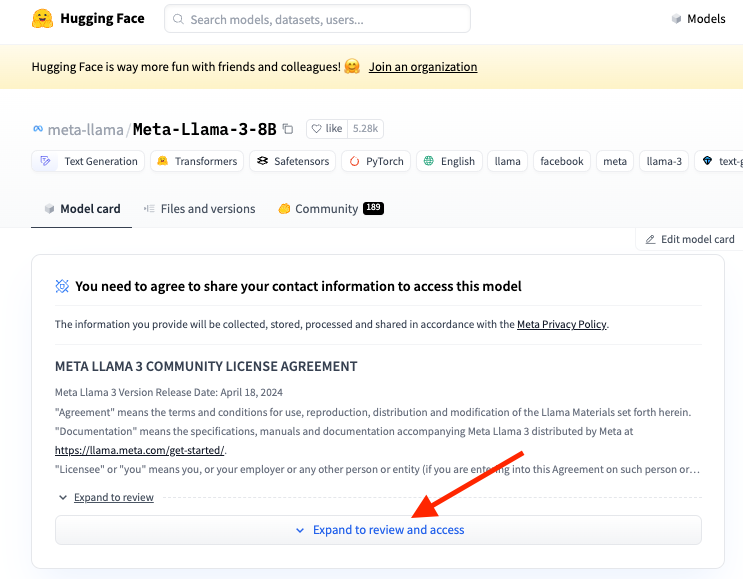
Create a Hugging Face token
Create a read-only token at https://huggingface.co/settings/tokens.
Save the token to a file
echo "your-token" > ~/.huggingface-token
Write a script to use the library
import os
import transformers
import torch
from huggingface_hub import login

with open(os.path.expanduser('~/.huggingface-token'), 'r') as file:
   token = file.read().strip()

login(token=token)

model_id = "llama3/Meta-Llama-3-8B/tokenizer.model"
model_id = "meta-llama/Meta-Llama-3-8B"

pipeline = transformers.pipeline(
    "text-generation", model=model_id, model_kwargs={"torch_dtype": torch.bfloat16}, device_map="auto"
)
print(pipeline("Hey how are you doing today?"))
View the generated response
[{'generated_text': 'Hey how are you doing today? I have been following your blog for a while now and I really like what you are doing. I wanted to know if you would be interested in a guest post on your blog. If you are interested, please email me at [email\xa0protected]. Thanks!\n 11. I think this is a great post, and I agree with you about the benefits of using a blog to market your business. I have been doing this for a while, and I can say that I have seen great results. I would recommend it to anyone who is looking to grow their business.'}]
Troubleshooting
CUDA and PyTorch Compatibility
Occasionally, the version of CUDA and PyTorch are not compatible. To resolve this, run the following command:
sudo apt-get install -y cuda-drivers
Remember to edit the config.json file with a read-only Hugging Face key to pull the model weights.
SentencePiece Error
ValueError: Cannot instantiate this tokenizer from a slow version. If it's based on sentencepiece, make sure you .have sentencepiece installed.
Solution: Install sentencepiece
pip install transformers[sentencepiece]
Awaiting Review Error
Cannot access gated repo for url https://huggingface.co/meta-llama/Meta-Llama-3-8B/resolve/main/config.json. Your request to access model meta-llama/Meta-Llama-3-8B is awaiting a review from the repo authors.
Solution: Wait for the model to be reviewed and approved. Check your status on https://huggingface.co/settings/gated-repos.
Accelerate Error
Cannot initialize model with low cpu memory usage because accelerate was not found in the environment. Defaulting to
low_cpu_mem_usage=False. It is strongly recommended to install accelerate for faster and less memory-intense model loading. You can do so with:
Solution: Install accelerate
pip install accelerate